Download the template
One file with five tabs. Open it in Excel or import it into Google Sheets. It works offline and nothing you type is sent to CCF.
Download the free template (.xlsx)
About 85 KB. Free direct download with no email needed.
Open it in Google Sheets
- Download the file above.
- Open Google Sheets and start a blank spreadsheet.
- Choose File then Import then Upload and pick the file.
- Pick Replace spreadsheet and import the data.
You can also upload the file to Google Drive and open it with Google Sheets.
What is inside
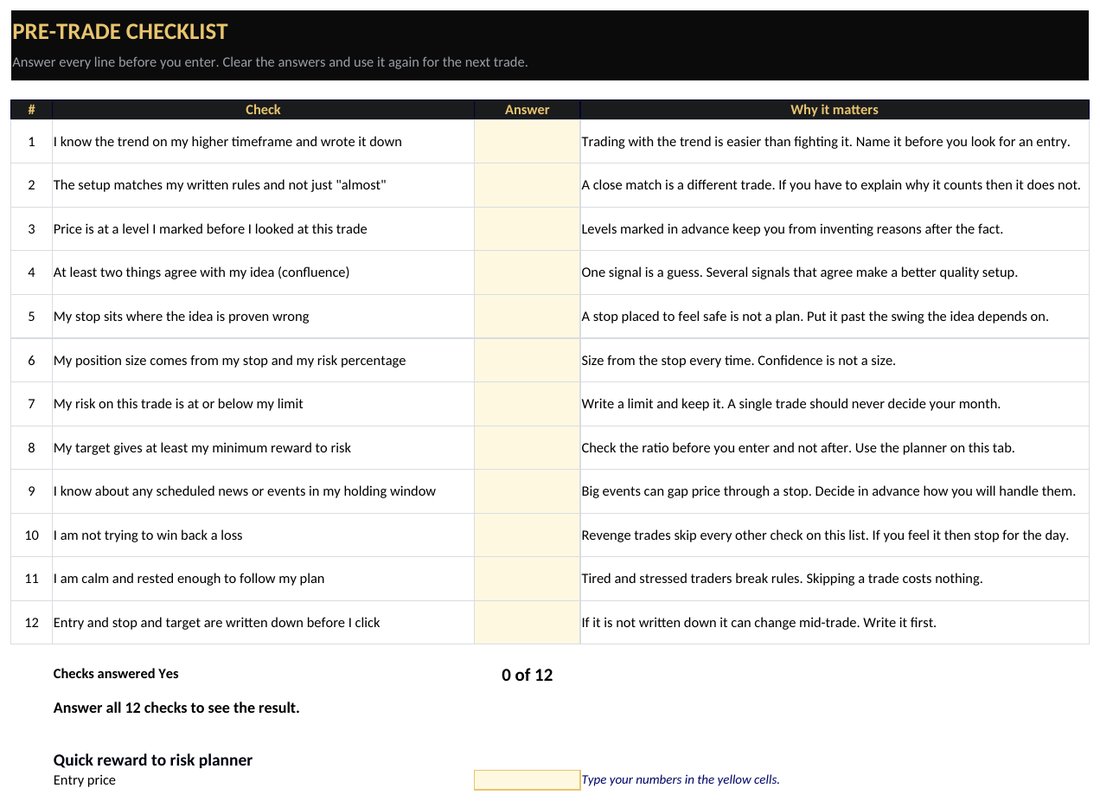
12 yes or no checks with a pass or fail result and a quick reward to risk planner.
500 rows. Enter entry and stop and exit and Result R calculates for longs and shorts.
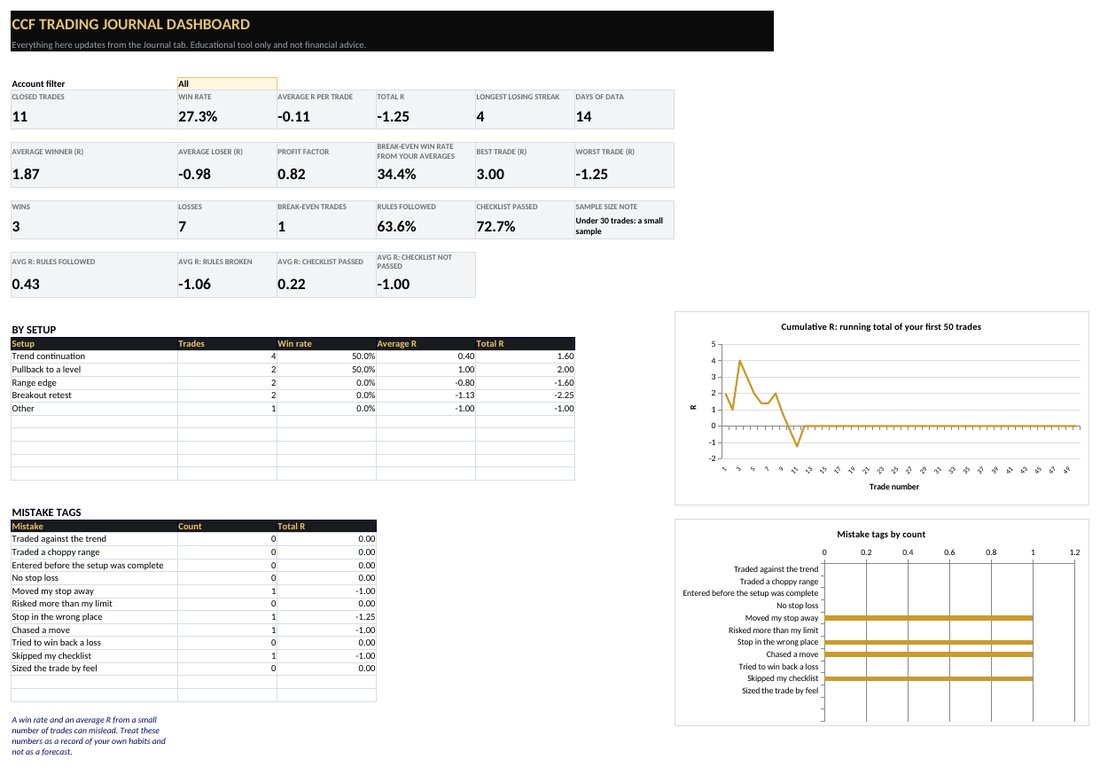
Win rate and average R and profit factor and longest losing streak. Results by setup and by mistake. Filter by Demo or Live.
Edit your setups and mistake tags and the drop-downs update.
Seven steps and a worked example.
See the template
The pre-trade checklist tab and the dashboard. The dashboard picture uses made-up example trades typed in only to show the layout. Swipe sideways on a phone to see the whole picture.
Why keep a trading journal
Memory edits your trades. A loss you were sure was bad luck often shows up in a journal as the same mistake for the third time. Writing down what you planned before the trade and what you did after it gives you a record you can check. That record is how you turn a vague feeling about your trading into numbers you can act on.
Read the full guide on how to keep a crypto trading journal and then use this template to start.
What to log on every trade
- The plan. Market and direction and entry and stop and target. Write them before you enter.
- The result. Your exit and the Result R. The sheet works out R for you.
- Your process. Did the trade pass your checklist and did you follow your rules?
- The mistake. One tag from the list when you broke a rule. Leave it blank when you did not.
- A note and a chart link. A single sentence on what you saw. A screenshot link helps when you review later.
The 12-point pre-trade checklist
These are the checks on the checklist tab. Answer all of them before you enter. A single No means fix the gap or skip the trade.
- I know the trend on my higher timeframe and wrote it down
Trading with the trend is easier than fighting it. Name it before you look for an entry. - The setup matches my written rules and not just "almost"
A close match is a different trade. If you have to explain why it counts then it does not. - Price is at a level I marked before I looked at this trade
Levels marked in advance keep you from inventing reasons after the fact. - At least two things agree with my idea (confluence)
One signal is a guess. Several signals that agree make a better quality setup. - My stop sits where the idea is proven wrong
A stop placed to feel safe is not a plan. Put it past the swing the idea depends on. - My position size comes from my stop and my risk percentage
Size from the stop every time. Confidence is not a size. - My risk on this trade is at or below my limit
Write a limit and keep it. A single trade should never decide your month. - My target gives at least my minimum reward to risk
Check the ratio before you enter and not after. Use the planner on this tab. - I know about any scheduled news or events in my holding window
Big events can gap price through a stop. Decide in advance how you will handle them. - I am not trying to win back a loss
Revenge trades skip every other check on this list. If you feel it then stop for the day. - I am calm and rested enough to follow my plan
Tired and stressed traders break rules. Skipping a trade costs nothing. - Entry and stop and target are written down before I click
If it is not written down it can change mid-trade. Write it first.
For a deeper look at two of these ideas read the glossary entries on confluence and stop-loss.
How to read your dashboard
- Win rate. The share of closed trades with a positive result. On its own it says little. Read it with your average winner and average loser.
- Average R. Your average result per trade in units of risk. This is your expectancy so far. The risk reward calculator shows how win rate and ratio fit together.
- Profit factor. Total R from winners divided by total R lost. Above 1 means winners outweighed losers in your sample.
- Longest losing streak. Check it against the losing streak table in the calculator so a normal run of losses does not surprise you.
- Rules followed versus rules broken. Compare the average R of both. This is the quickest way to see what your mistakes cost you.
A small sample can mislead. The dashboard marks fewer than 30 trades as a small sample. Treat the numbers as a record of your own habits and not as a forecast.
Sizing your trades
The journal records what you risked. It does not size the trade for you. Use the position size calculator to turn your account size and risk percentage and stop into an amount to buy. Then log the trade here.
About this template
CCF built this free template. CCF was founded by Joshua Montoya and Marty Cooney as equal co-founders. The formulas were checked against independent calculations on sample trades for long and short results and for the Demo and Live filter and the checklist result. Last updated November 3, 2026.
Frequently asked questions
Is this crypto trading journal template really free?
Yes. It is a free direct download with no sign-up. You get a spreadsheet file that you can keep and edit. CCF built it for education and it does not connect to any exchange or account.
Does it work in Google Sheets?
Yes. Download the file and import it. In Google Sheets choose File then Import then Upload and pick the file. You can also upload it to Google Drive and open it with Google Sheets. The formulas and drop-downs carry over. Charts can look a little different after import.
What is R in trading?
R is the amount you risk on a trade. A trade that makes twice your risk is +2R and a trade stopped out is -1R. Logging results in R lets you compare trades of different sizes. The Result R column calculates it from your entry and stop and exit.
What should I track in a trading journal?
Track the date and market and direction and your entry and stop and target and exit. Add whether you followed your rules and the mistake you made if any. A short note and a chart link help when you review. The template has a column for each of these.
What is the pre-trade checklist for?
It is 12 yes or no questions you answer before you enter a trade. If any answer is No you fix the gap or skip the trade. It keeps you tied to your own written rules when a setup feels exciting.
How many trades does the journal hold?
The Journal tab has 500 rows and every statistic reads from them. When it fills up make a copy of the file and start a fresh one.
Can I use it for demo trades and live trades?
Yes. Each trade has an Account column where you pick Demo or Live. The Dashboard has a filter so you can look at them separately. Many educators suggest practicing on a demo account before using real money.
How many trades do I need before the numbers mean anything?
A handful of trades can mislead. Win rate and average R from a small sample swing a lot. The Dashboard flags anything under 30 trades as a small sample. More data gives steadier numbers but nothing guarantees future results.
Is this financial advice?
No. This is an educational template. It does arithmetic on the numbers you type. It does not predict results or know your situation. Trading involves risk including loss of principal.
More from CCF
Educational content only. CCF provides general education about digital assets, trading and investing. This template does arithmetic on the numbers you enter. It is not individualized financial, investment, legal or tax advice and CCF does not guarantee any outcome or return.